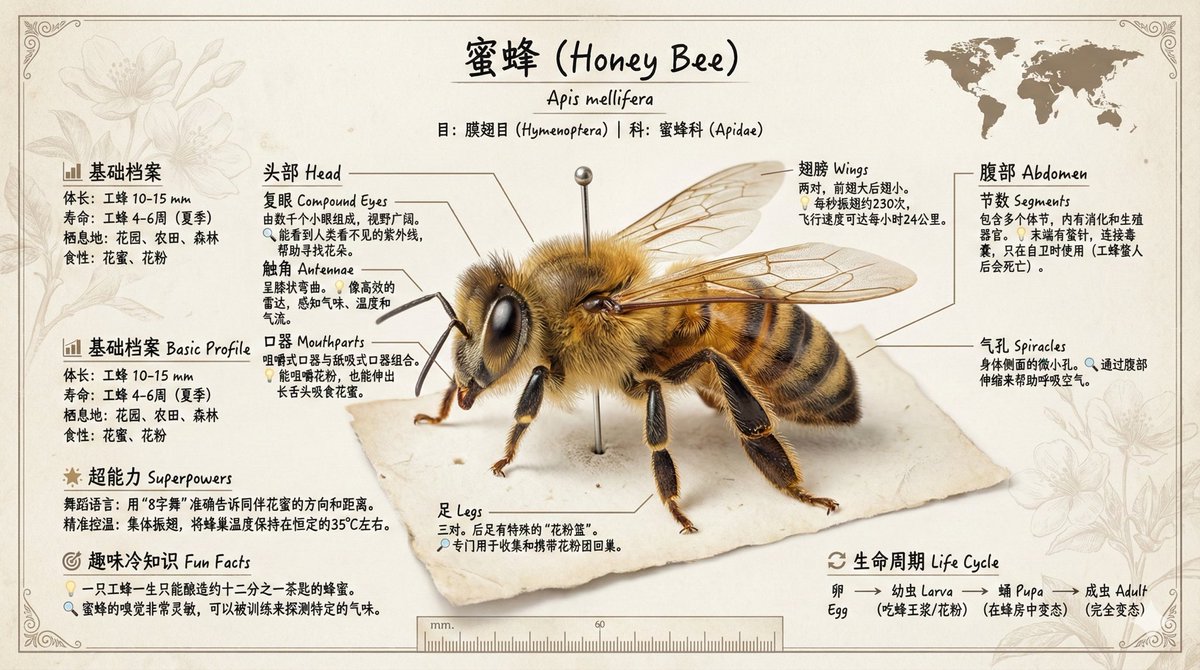
Museum-Quality Insect Knowledge Infographic
prompt
Please create a museum-quality insect knowledge infographic, focusing on showcasing 【Bees】.

Core Layout:
- Center: A large image of an insect specimen, occupying 60-70% of the space
- Surrounding: Scientific labels and interesting encyclopedia information, arranged radially or in sections
- Overall: Like a beautiful specimen description card in a museum glass display case

Insect Specimen Presentation (Core Requirements):
1. Physical Realism: The insect specimen is directly placed flat on the paper, not as a "picture within a picture"
2. Perspective: Vertical overhead view, with the specimen on the same plane as the paper
3. Light and Shadow: Soft natural light shining from above, casting delicate shadows of the specimen on the paper
4. Fixation Method: The specimen is realistically fixed with an insect pin (a long silver pin), piercing through the specimen's body, with the tip slightly embedded in the paper
5. Detail Texture:
   - Visible real textures of the specimen: wing veins, hairs, scales, and reflections from compound eyes
   - The edges of the specimen have a slight thickness and three-dimensional feel
   - Wings may have a slight translucency effect
   - The area around the pin has subtle indentations or pinholes
6. Proportion: The specimen occupies about 60-70% of the center of the paper, leaving space around for labels
7. Natural State: The wings are in a natural pose, not overly stiff, preserving the specimen's true texture

Labeling System Design:
Use guiding lines (thin lines) extending from the insect's body parts to the description text boxes

Essentially Labeled Body Parts (6-8):
1. Head
   - Compound Eyes: How many small eyes are there? What is the field of vision?
   - Antennae: What is their purpose? How many segments?
   - Mouthparts: What type do they belong to? What do they eat?

2. Thorax
   - Prothorax/Mesothorax/Metathorax: Their respective functions
   - Wings: How many pairs? What is the flying speed? Special abilities?
   - Legs: How many pairs? Special functions like grasping/jumping/swimming?

3. Abdomen
   - Segments: How many body segments?
   - Special Organs: Light organs/stingers/ovipositors, etc.
   - Spiracles: How do they breathe?

4. Unique Structures
   - The most distinctive body features of this insect
   - Relationship with the survival environment

Information Card Content:
Each label includes:
- Body part name (in Chinese and English)
- 1-2 sentences explaining the function (child-friendly language)
- Interesting data or trivia (marked with 🔍 or 💡 icons)

Other Page Elements:

Top Area:
- Insect Chinese Name (large title, elegant font)
- Scientific Name (italicized Latin, subtitle)
- Taxonomic Order/Family (small print)
- Distribution Map Icon (world map with highlighted distribution areas)

Bottom/Side Information Bar:
Basic Profile
- Body Length: X-X mm
- Lifespan: X days/months/years
- Habitat: Forests/Grasslands/Wetlands, etc.
- Diet: Herbivorous/Carnivorous/Omnivorous

Superpowers/Special Skills
- List 2-3 coolest abilities
- Use simple icons + text explanations

Fun Trivia
- 1-2 interesting facts to attract children
- For example, "Can lift objects 50 times its own weight"

Life Cycle
- Simplified metamorphosis process illustration
- Egg → Larva → Pupa → Adult (complete metamorphosis)
- Or Egg → Nymph → Adult (incomplete metamorphosis)

*Design Aesthetics:
- Paper Texture:
  Base Paper: Cream or ivory high-quality paper texture #F8F6F0
  Visible fine fibers and texture of the paper
  Edges may have slight wear or a vintage feel (optional)

- Spatial Relationship:
  Specimen: Physical entity, flat on the paper, with real shadows
  Insect Pin: Silver metallic texture, piercing through the specimen for fixation
  Label Text: Directly written or printed on the same paper
  Guiding Lines: Thin lines drawn on the paper

- Color Scheme:
  Paper Base Color: #F8F6F0 (cream) or #FFFEF7 (ivory)
  Label Text: #2C3E50 (ink color/deep gray-blue) handwritten or printed style
  Guiding Lines: #8B7355 (brown-gray) or #696969 (charcoal gray) thin lines
  Emphasis Markings: #D4AF37 (antique gold) or #8B4513 (brown)
  Insect Pin: Silver-gray metallic sheen #C0C0C0

- Font System:
  Title: Handwritten style or elegant print (Garamond/Songti)
  Scientific Name: Italic handwritten or printed style
  Label Text: Clear handwritten or small printed font
  Overall Feel: Like a naturalist personally writing on the specimen paper

- Decorative Elements:
  Corners: Simple line frames or decorative corner flowers (printed on paper)
  Ruler: Millimeter scale ruler, parallel to the specimen
  Date/Number: Handwritten style collection information (optional)
  Plant Silhouette Watermark: Faintly printed on the paper (optional)
Key Visual Points:
The entire image is "a flat specimen paper" with a real insect specimen fixed on it, surrounded by handwritten or printed scientific labels. The viewer feels as if they are looking down at a specimen record on a naturalist's workbench.

Layout Style Reference: Like opening a 19th-century naturalist's specimen book, with the insect specimen realistically fixed on the paper, surrounded by handwritten or beautifully printed scientific annotations. The overall presentation conveys a flat, yet physically textured aesthetic—this is not a photo, but a coexistence of the specimen and the paper.

Key Concepts:
- ❌ Do not: A photo of the specimen placed in the image
- ✅ Do: The specimen itself is on the paper, sharing the same physical plane as the text
- Like a page from an antique specimen book or a naturalist's work record

Image Specifications:
- Ratio: 16:9 (landscape poster) or 3:4 (portrait display board)
- Resolution: 300 DPI, suitable for A3/A2 printing
- Format: PNG high definition, preserving details

Scientific Accuracy Requirements:
- Body structure proportions conform to real insect morphology
- Professional terminology used accurately
- Children's descriptions must be scientific yet vivid

Please ensure the overall presentation maintains both the academic rigor of a museum and the visual appeal that attracts children's exploration.
Related prompts
Suggested alternatives based on similar intent and language.
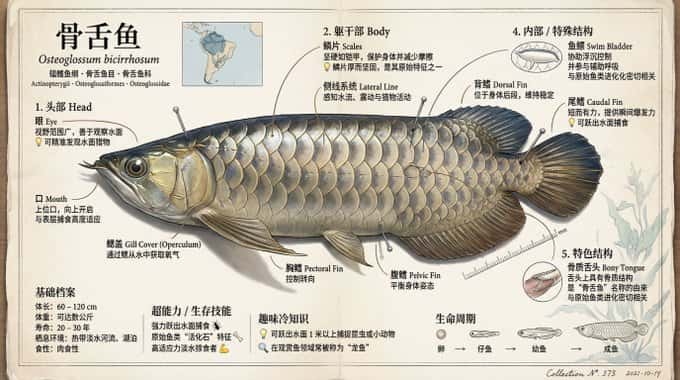
Museum-Grade Fish Knowledge Infographic
This prompt is for educators and designers creating engaging fish educational materials, resulting in a visually appealing infographic for learning.
Why creators keep returning to AI Prompt Copy
AI Prompt Copy grew from late-night experiments where we packaged the most effective prompt ideas into a single workspace so every creator could ship faster.
Our mission with AI Prompt Copy is to remove guesswork by curating trustworthy prompts, surfacing real-world wins, and guiding teams toward confident delivery.
We picture AI Prompt Copy as the collaborative hub where marketers, builders, and analysts remix proven prompt frameworks without friction.
Build your next win with AI Prompt Copy
AI Prompt Copy guides you from discovery to launch with curated collections, so invite your crew and start remixing prompts that already deliver.
Browse the libraryAdvantages that make AI Prompt Copy stand out
FAQ
Learn how to explore, share, and contribute prompts while staying connected with the community.
How should I tailor Museum-Quality Insect Knowledge Infographic before running it?
Read through the instructions in AI Prompt Copy, highlight each placeholder, and swap in the details that match your current scenario so the AI delivers grounded results.
What is the best way to collaborate on this prompt with my team?
Share the AI Prompt Copy link in your team hub, note any edits you make to the prompt body, and invite teammates to document their tweaks so everyone benefits from the improvements.
How can I save useful variations of this prompt?
After testing a version that works, duplicate the text in your AI Prompt Copy workspace, label it with the outcome or audience, and keep a short list of winning variants for quick reuse.
What can I do with AI Prompt Copy?
Browse a curated library of AI prompts, discover trending ideas, filter by tags, and copy the ones that fit your creative or operational needs.
How do I use a prompt from the AI Prompt Copy library?
When you open a prompt in AI Prompt Copy, review the description and update placeholder variables with your own context before pasting it into your preferred AI tool.
How can I share AI Prompt Copy prompts with my team?
Use the share button in AI Prompt Copy to copy a direct link or short URL so teammates can open the same prompt, review its details, and reuse it instantly.
Can I submit my own prompts to AI Prompt Copy?
Yes. Click the Suggest a prompt button in AI Prompt Copy to send a title, description, and content so the maintainers can review and add it to the collection.
Where do AI Prompt Copy prompts come from?
Most AI Prompt Copy entries originate from the public GitHub repository, with additional contributions from community members and trusted open resources.
How do I leave feedback or report an issue?
Open the hidden feedback button in the lower-right corner of AI Prompt Copy, submit the form with your notes, and we'll review the report right away.
How do I onboard new teammates with our prompt playbook?
Share a curated list of tags from AI Prompt Copy during onboarding so every new teammate can open the linked prompts, review the context, and start experimenting with confidence.
What workflow keeps campaign collaborators aligned?
Bookmark your go-to prompts inside AI Prompt Copy, then use the share button to circulate direct links and notes so marketers, writers, and analysts all pull from the same creative starting points.
Can I adapt prompts for teams in regulated industries?
Yes. Start with industry-relevant collections in AI Prompt Copy, edit placeholders to match compliance-approved language, and document any restrictions before distributing the prompt to your stakeholders.
Where do I find help tailoring prompts to my use case?
Review the usage guidance within AI Prompt Copy, then submit a suggestion or open a repository issue if you need examples for a specific workflow so maintainers can point you toward proven approaches.