prompt
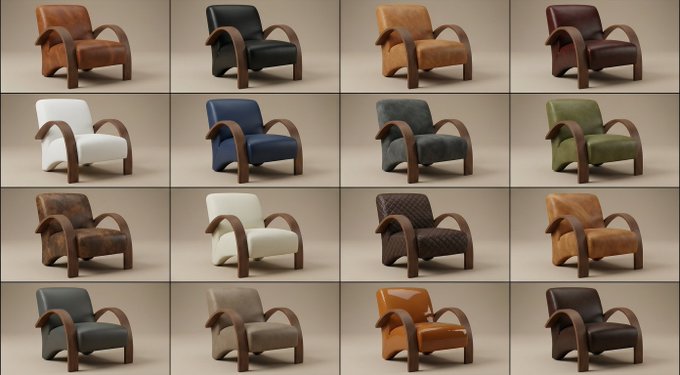
4x4 grid of identical 3D object renders showing the same furniture piece with 16 different material applications. Each cell displays the exact same object geometry with a unique surface texture applied.

Object: Curved sculptural seating form with rounded back, cushioned seat, and four angled legs. Organic mid-century modern silhouette with smooth flowing lines, gently sloped armrests, and comfortable proportions. Single unified form without separate cushions or pillows.

Camera specifications: Fixed 3/4 front angle view, warm showroom lighting from upper-left at 45°, soft ambient fill light, identical framing across all 16 cells, subtle floor shadow beneath object, clean neutral gradient background.

Object geometry (identical in all cells):
* Same exact 3D model in every cell
* Same camera angle and distance
* Same lighting setup
* Only the surface material changes between cells

16 unique material applications (one per cell, left to right, top to bottom):

Row 1 - Soft Luxury:
* Cell 1: Midnight blue velvet - deep navy plush pile absorbing light across curved surfaces
* Cell 2: Cognac full-grain leather - warm caramel with natural grain wrapping around form
* Cell 3: Cream bouclé - chunky looped wool texture following organic contours
* Cell 4: Blush pink silk - luminous soft draping appearance with subtle sheen on curves

Row 2 - Natural Elements:
* Cell 5: Live-edge walnut wood - rich brown grain flowing across entire solid form
* Cell 6: White Carrara marble - bright polished stone with gray veins (sculptural interpretation)
* Cell 7: Natural rattan weave - honey tan woven cane pattern covering all surfaces
* Cell 8: Olive green shagreen - textured bumpy stingray pattern on elegant form

Row 3 - Metals & Industrial:
* Cell 9: Brushed brass - warm golden metal with soft directional scratches
* Cell 10: Matte black steel - powder-coated charcoal covering entire form
* Cell 11: Polished chrome - mirror-like silver reflecting environment
* Cell 12: Antique bronze - deep brown with green patina weathering

Row 4 - Statement Finishes:
* Cell 13: Emerald green lacquer - jewel tone high-gloss reflective surface
* Cell 14: Smoked glass - dark translucent gray showing form as sculptural object
* Cell 15: Camel herringbone wool - warm tan zigzag woven textile on all surfaces
* Cell 16: Mother of pearl - iridescent shell mosaic with rainbow shimmer across curves

Material application rules:
* Each material wraps entirely around the object
* Texture scale appropriate for furniture size
* Material responds correctly to object curvature
* Lighting reveals unique surface properties of each material
* Realistic rendering quality showing how material would actually appear

Technical requirements:
* Identical object silhouette in all 16 cells
* Zero variation in geometry, camera, or lighting
* Only surface material differs between cells
* Clean grid layout with thin borders
* Professional product visualization quality
* Each cell could serve as standalone product render

Purpose: Material exploration for furniture design, showing clients how the same form transforms with different surface treatments. Demonstrates versatility of single design across fabric, leather, wood, metal, stone, and decorative finishes.

Output: 4x4 seamless grid comparing 16 material options on identical object. Presentation-ready format for design review, client selection, or 3D visualization portfolio.
Related prompts
Suggested alternatives based on similar intent and language.

Deep Red Dress Woman Holding White Wine
This prompt is for artists or designers creating high-end visuals of women in elegant settings, helping produce detailed and refined imagery.
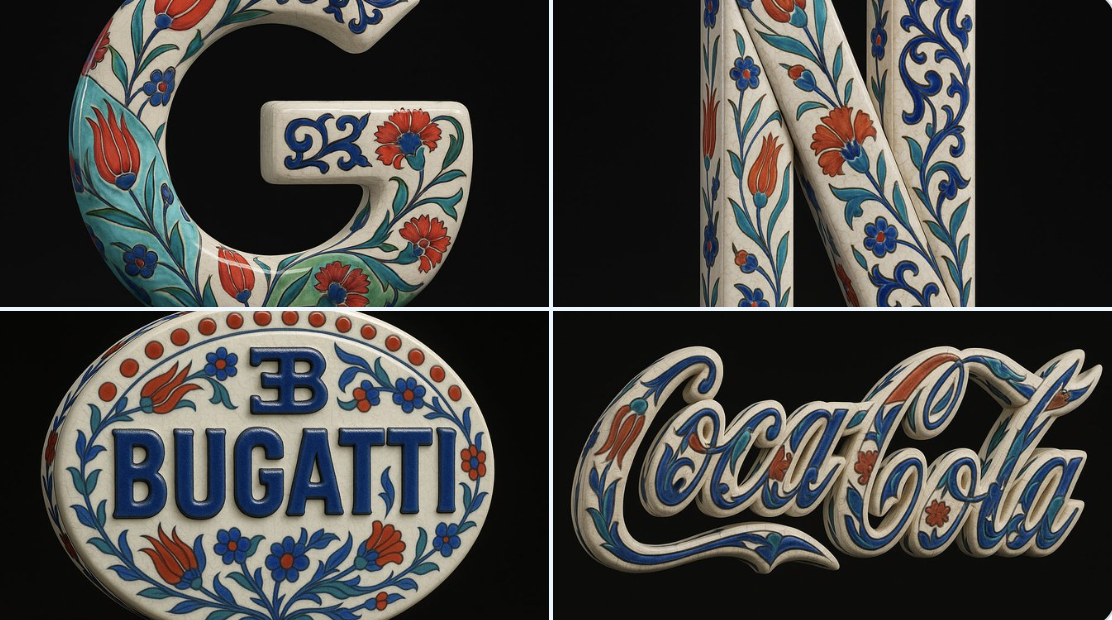
Blue and White Porcelain Style
This prompt is for 3D artists looking to create a luxurious ceramic version of a logo, producing a hyper-realistic sculpture with intricate Ottoman designs.
Why creators keep returning to AI Prompt Copy
AI Prompt Copy grew from late-night experiments where we packaged the most effective prompt ideas into a single workspace so every creator could ship faster.
Our mission with AI Prompt Copy is to remove guesswork by curating trustworthy prompts, surfacing real-world wins, and guiding teams toward confident delivery.
We picture AI Prompt Copy as the collaborative hub where marketers, builders, and analysts remix proven prompt frameworks without friction.
Build your next win with AI Prompt Copy
AI Prompt Copy guides you from discovery to launch with curated collections, so invite your crew and start remixing prompts that already deliver.
Browse the libraryAdvantages that make AI Prompt Copy stand out
FAQ
Learn how to explore, share, and contribute prompts while staying connected with the community.
How should I tailor 16 Different Surface Materials before running it?
Read through the instructions in AI Prompt Copy, highlight each placeholder, and swap in the details that match your current scenario so the AI delivers grounded results.
What is the best way to collaborate on this prompt with my team?
Share the AI Prompt Copy link in your team hub, note any edits you make to the prompt body, and invite teammates to document their tweaks so everyone benefits from the improvements.
How can I save useful variations of this prompt?
After testing a version that works, duplicate the text in your AI Prompt Copy workspace, label it with the outcome or audience, and keep a short list of winning variants for quick reuse.
What can I do with AI Prompt Copy?
Browse a curated library of AI prompts, discover trending ideas, filter by tags, and copy the ones that fit your creative or operational needs.
How do I use a prompt from the AI Prompt Copy library?
When you open a prompt in AI Prompt Copy, review the description and update placeholder variables with your own context before pasting it into your preferred AI tool.
How can I share AI Prompt Copy prompts with my team?
Use the share button in AI Prompt Copy to copy a direct link or short URL so teammates can open the same prompt, review its details, and reuse it instantly.
Can I submit my own prompts to AI Prompt Copy?
Yes. Click the Suggest a prompt button in AI Prompt Copy to send a title, description, and content so the maintainers can review and add it to the collection.
Where do AI Prompt Copy prompts come from?
Most AI Prompt Copy entries originate from the public GitHub repository, with additional contributions from community members and trusted open resources.
How do I leave feedback or report an issue?
Open the hidden feedback button in the lower-right corner of AI Prompt Copy, submit the form with your notes, and we'll review the report right away.
How do I onboard new teammates with our prompt playbook?
Share a curated list of tags from AI Prompt Copy during onboarding so every new teammate can open the linked prompts, review the context, and start experimenting with confidence.
What workflow keeps campaign collaborators aligned?
Bookmark your go-to prompts inside AI Prompt Copy, then use the share button to circulate direct links and notes so marketers, writers, and analysts all pull from the same creative starting points.
Can I adapt prompts for teams in regulated industries?
Yes. Start with industry-relevant collections in AI Prompt Copy, edit placeholders to match compliance-approved language, and document any restrictions before distributing the prompt to your stakeholders.
Where do I find help tailoring prompts to my use case?
Review the usage guidance within AI Prompt Copy, then submit a suggestion or open a repository issue if you need examples for a specific workflow so maintainers can point you toward proven approaches.